
The df (Disk Filesystem) command is used to display information about the total, used, and available disk space on all mounted filesystems in a Linux environment. It helps system administrators and users monitor storage usage and identify disks that may be reaching capacity.
df -kh
|
Option |
Description |
|
-k |
Displays filesystem information in 1024-byte (KB) blocks. |
|
-h |
Prints sizes in a human-readable format (e.g., KB, MB, GB, TB). |
This combination (-kh) provides an easy-to-read summary of disk usage across all mounted partitions.
Example Output
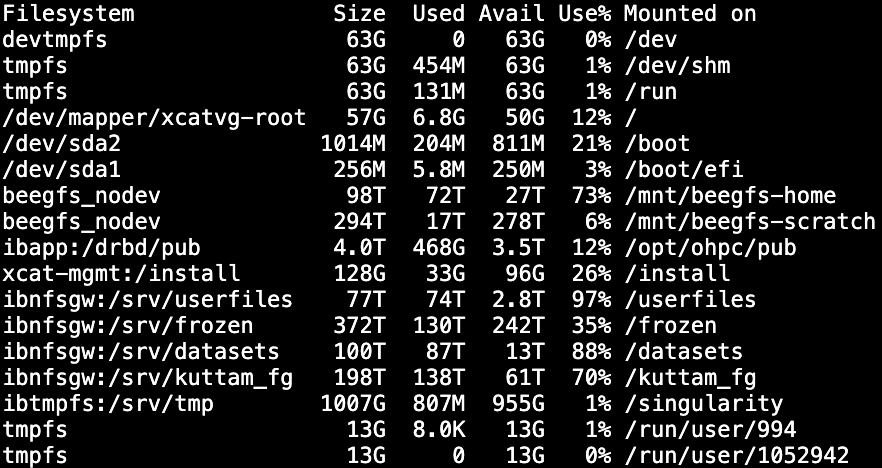
Key Mount Points from Example Output
|
Mount Point |
Filesystem Type / Source |
Purpose / Description |
|
/ |
Local disk (/dev/mapper/xcatvg-root) |
Root filesystem; operating system and core binaries. |
|
/boot, /boot/efi |
Local partitions (/dev/sda1, /dev/sda2) |
Boot and EFI partitions for the OS kernel and bootloader. |
|
/mnt/beegfs-home |
BeeGFS |
Central user home directories for cluster users. |
|
/mnt/beegfs-scratch |
BeeGFS |
High-performance scratch space for temporary job data. Not backed up. |
|
/opt/ohpc/pub |
NFS mount (ibapp:/drbd/pub) |
Shared public applications and software repositories. |
|
/install |
NFS mount (xcat-mgmt:/install) |
XCAT installation and provisioning directory. |
|
/kuttam_fg |
NFS (ibnfsgw:/srv/kuttam_fg) |
Dedicated storage for the Kuttam team |
|
/datasets |
NFS (ibnfsgw:/srv/datasets) |
Shared datasets available to all users. |
|
/userfiles |
NFS (ibnfsgw:/srv/userfiles) |
User-provided datasets or project data. |
|
/frozen |
NFS (ibnfsgw:/srv/frozen) |
Archived or frozen data for long-term retention. |
|
/singularity |
NFS (ibtmpfs:/srv/tmp) |
Temporary space for Singularity container images. |
|
/run/user/* |
Temporary virtual memory (tmpfs) |
Per-user runtime directories for sessions. Automatically cleared. |