
The command scontrol show node <node_name> is used to display detailed information about a specific compute node in the SLURM cluster.
Example Output:
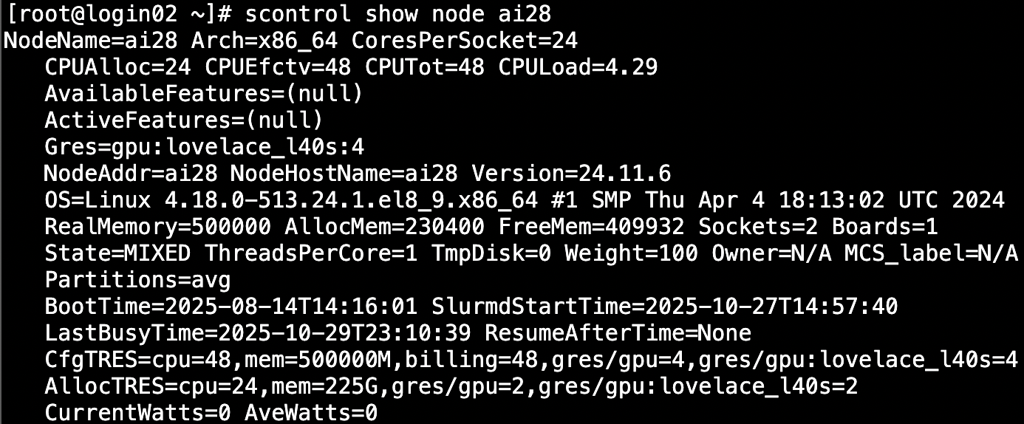
Explanation of Fields
|
Field |
Description |
|
NodeName |
The name of the node (e.g., ai28). |
|
Arch |
CPU architecture (e.g., x86_64). |
|
CoresPerSocket |
Number of CPU cores per socket. |
|
CPUAlloc / CPUEfctv / CPUTot / CPULoad |
CPUAlloc: Number of cores currently allocated to jobs. CPUEfctv: Effective CPUs available for scheduling (usually same as CPUAlloc). CPUTot: Total number of CPU cores. CPULoad: Current CPU load (system average over 1 minute). |
|
AvailableFeatures / ActiveFeatures |
Node-specific tags (features) defined in SLURM configuration, used for constraints in job submissions. (null) means no custom features defined. Example usage: sbatch --constraint=tesla_v100 job.sh. |
|
Gres |
Generic resources on the node — here it shows gpu:lovelace_l40s:4, meaning 4 NVIDIA L40S GPUs. |
|
NodeAddr / NodeHostName |
The network address and hostname of the node. |
|
Version |
SLURM version running on this node. |
|
OS |
Operating system and kernel version. |
|
RealMemory / AllocMem / FreeMem |
RealMemory: Total physical memory available on the node (in MB). AllocMem: Memory currently allocated to running jobs. FreeMem: Unused memory reported by slurmd. |
|
Sockets / Boards / ThreadsPerCore |
Hardware topology — number of sockets, boards, and threads per core. |
|
State |
Node status: IDLE: Node is free. ALLOCATED: Fully used by jobs. MIXED: Partially used.DOWN or DRAIN: Unavailable for jobs. |
|
TmpDisk |
Temporary local disk size (in MB or GB). |
|
Weight |
Scheduling weight — higher values increase node selection priority. |
|
Partitions |
List of partitions where this node belongs (e.g., avg). |
|
BootTime / SlurmdStartTime |
When the node was last booted and when the SLURM daemon (slurmd) started. |
|
LastBusyTime |
Timestamp of the last activity (when the node last ran a job). |
|
ResumeAfterTime |
If configured, the time after which the node automatically resumes from a suspended state. |
|
CfgTRES |
Configured “Trackable Resources” for this node — includes CPUs, memory, GPUs, etc. |
|
AllocTRES |
Currently allocated resources (to active jobs). |
|
CurrentWatts / AveWatts |
Power consumption metrics (if sensors are available). Here, both are 0, meaning no power monitoring data. |