
After submitting jobs on KUACC or VALAR, users should monitor their jobs to check the status and resource usage.
squeue: Displays information about jobs currently in the Slurm scheduling queue (pending, running, held, etc.).
squeue –u username
Shows only your jobs.
kuacc-queue / valar-queue: Cluster-specific helper scripts that provide a simplified or customized view of the job queue (often with extra formatting or filtering for those systems).
kuacc-queue | grep username
valar-queue | grep username
or
kuacc-queue | more
valar-queue | more
Below is an example of the valar-queue command output, along with explanations of each column.
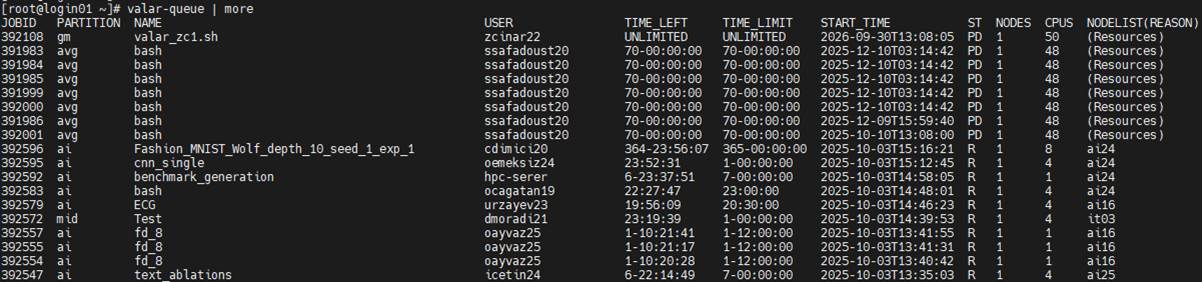
|
|
Description |
|
JOBID |
Unique identifier assigned to the job by Slurm. |
|
PARTITION |
Partition (queue) where the job is submitted, e.g., short, long, gpu. |
|
NAME |
Job name (set with #SBATCH -J; if not provided, the script name is used). |
|
USER |
Username of the job owner. |
|
TIME_LEFT |
Remaining walltime before the job reaches its limit. |
|
TIME_LIMIT |
Maximum walltime allocated to the job (from #SBATCH -t). |
|
START_TIME |
Actual or scheduled start time of the job. |
|
ST (STATE/STATUS) |
Current state of the job. Common values include: R = Running PD = Pending CG = Completing CD = Completed CA = Cancelled F = Failed TO = Timeout NF = Node Fail
|
|
NODES |
Number of nodes allocated to the job. |
|
CPUS |
Total number of CPU cores allocated to the job. |
|
NODELIST(REASON) |
If running, shows the node(s) allocated. If pending, shows the reason (e.g., Resources, Priority, Dependency). |
NODELIST(REASON) Column: Meaning of Common Reasons
|
Reason |
Meaning |
|
InvalidQOS |
The job’s Quality of Service (QOS) is invalid. |
|
Priority |
One or more higher-priority jobs are ahead in the queue; your job will run eventually. |
|
Resources |
The job is waiting for required resources (CPU, memory, nodes) to become available. |
|
PartitionNodeLimit |
The job’s requested nodes exceed the partition’s current limits, or required nodes are DOWN/DRAINED. |
|
PartitionTimeLimit |
The job’s requested runtime exceeds the partition’s time limit. |
|
QOSJobLimit |
The maximum number of jobs allowed for this QOS has been reached. |
|
QOSResourceLimit |
The QOS has reached a resource allocation limit. |
|
QOSTimeLimit |
The QOS has reached its maximum allowed time. |
|
QOSMaxCpuPerUserLimit |
Maximum number of CPUs per user for this QOS has been reached; job will run eventually. |
|
QOSGrpMaxJobsLimit |
Maximum number of jobs for the QOS group has been reached; job will run eventually. |
|
QOSGrpCpuLimit |
All CPUs allocated to the job’s QOS group are in use; job will run eventually. |
|
QOSGrpNodeLimit |
All nodes allocated to the job’s QOS group are in use; job will run eventually. |
For a complete list of reason codes, refer to this link. In practice, the most commonly encountered reasons are Priority, Resources, and QOSMaxCpuPerUserLimit.