
-
How can I access AI tools?
You can access Copilot and Gemini Education by signing in with your institutional account.
-
Copilot: Through Microsoft 365 applications or via the web.
-
Gemini Education: After logging in with your Google Workspace account, through the “Gemini” application.
-
What should I do about performance or access issues?
Check the following:
-
Internet connection
-
Browser updates
-
Whether you are logged in correctly (make sure you are signed in with your KU account)
If the problem persists, you can contact the IT support unit.
-
Are Gemini and Copilot chat histories deleted?
This feature is not yet available for the Google Gemini version we are using. However, you can prevent your Gemini chat history from being displayed. Please follow the instructions below. For Copilot, you can delete your chat history either individually or in bulk.
If you do not want to keep any chat history on Gemini, you need to join the privileged group via the link below. Once you join this group, your existing chat history will no longer be visible within 72 hours. After joining, no chat history will be stored at all. For Google Edu accounts, there is no option to delete chat history individually.
https://groups.google.com/a/ku.edu.tr/g/01-Allow-GeminiConversationClosedHistory
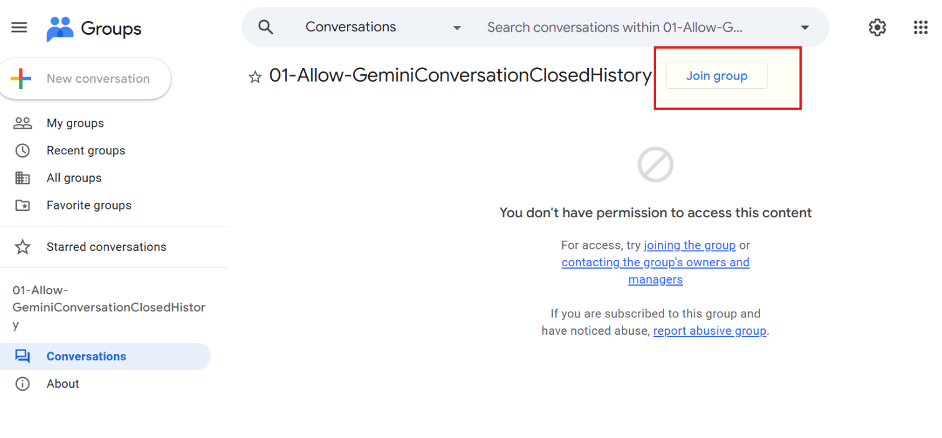
If you would like to enable chat history again later, you need to cancel your membership in this group. To leave the group, sign in to My Groups with your account and click the ‘Leave group’ button under the relevant group.”

Tip: Gemini chat history at our university is stored for up to 18 months, so you can refer back to previous conversations within this period.
-
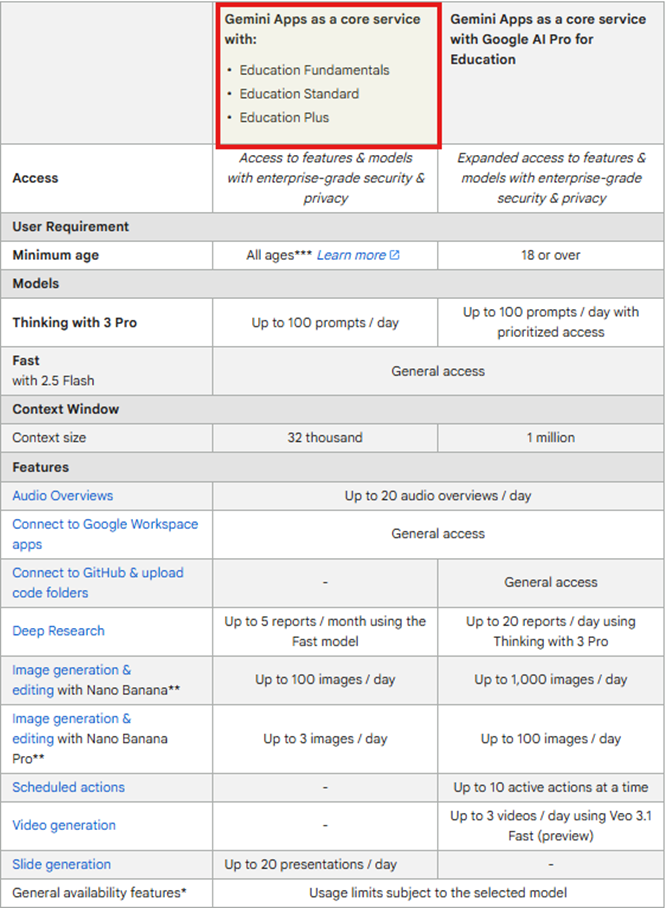
Can I use a Gemini Pro license?
As a university, we do not have a Gemini Pro license. You may use it by purchasing it through personal accounts. Our current usage plan for KU accounts is shown below.
You can visit the official Google website.
-
Can I use a Copilot Pro license?
We do not have a Copilot Pro license. You can view what you can do with the current version at the Microsoft 365 Copilot link.
-
Can I access Google Photos content with Gemini?
Since the Google Photos service is disabled for some of our users due to institutional policies, you may not be able to access image processing or image analysis results.
-
Do we have a Google NotebookLM license?
As an educational institution, we are included in the following licensing plans:-
Education Fundamentals
-
Education Standard
-
Education Plus
You can review the available features through the official Google page below:
Use NotebookLM with a work or school Google account - NotebookLM Help
-
-
How can I access the quick start guide for Gemini and NotebookLM?
You can access it via the link below:Quickstart Guide to Gemini and NotebookLM for Education - Google Workspace Admin Help
-
Yapay zeka araçlarına nasıl erişebilirim?
Copilot ve Gemini Education’a kurumsal hesabınızla giriş yaparak erişebilirsiniz.
-
Copilot: Microsoft 365 uygulamaları içinden veya web üzerinden.
-
Gemini Education: Google Workspace hesabınızla giriş yaptıktan sonra “Gemini” uygulamasından.
-
Performans ve erişim sorunları ile ilgili ne yapmalıyım?
Aşağıdakileri kontrol edin:
-
İnternet bağlantısı
-
Tarayıcı güncelliği
-
Hesaba doğru şekilde giriş yapıp yapmadığınız (KU hesabı ile login olduğunuzdan emin olmalısınız)
Sorun devam ederse BT destek birimiyle iletişime geçebilirsiniz.
-
Gemini ve Co-pilot sohbet geçmişi siliniyor mu?
Kullandığımız Google Gemini sürümü için henüz bu özellik bulunmuyor. Co-pilot için konuşma geçmişini toplu yada seçerek silebilirsiniz.
-
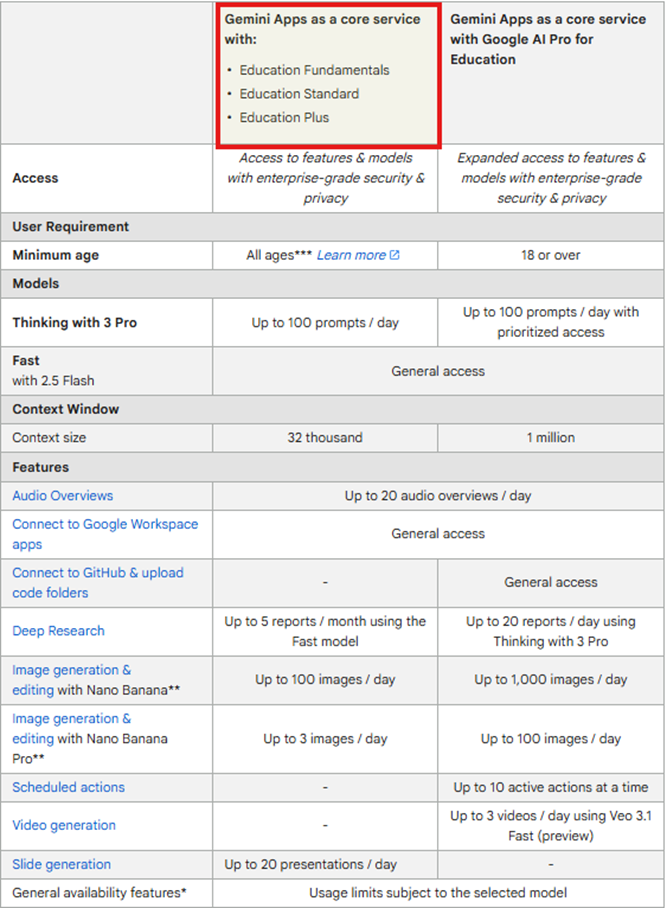
Gemini Pro lisansını kullanabilir miyim ?
Üniversite olarak Gemini pro lisansımız bulunmuyor. Kişisel hesaplar üzerinden satın alma yaparak kullanabilirsiniz. Ku hesapları için mevcut kullanım planımız aşağıdaki gibidir.Daha fazla bilgi için google resmi web sitesini ziyaret edebilirsiniz.
-
Co-pilot Pro lisansı kullanabilir miyim ?
Co-pilot pro lisansımız bulunmuyor. Mevcut sürüm ile yapabilceğiniz işlemlere Microsoft 365 Copilot linkinden ulaşabilirsiniz.
-
Gemini ile Google Photos içeriklerine erişebilir miyim ?
Google Photos servisi kurum politikaları gereği bazı kullanıcılarımıza kapalı olduğundan görsel işleme ve görsel analiz sonuçlarına ulaşamayabilirsiniz.
-
Google NotebookLM lisansımız var mı?
Bir eğitim kurumu olarak aşağıdaki lisans planlarına dahiliz:-
Education Fundamentals
-
Education Standard
-
Education Plus
Mevcut özellikleri aşağıdaki resmi Google sayfasından inceleyebilirsiniz:
Use NotebookLM with a work or school Google account - NotebookLM Help -
-
Kurumsal veya okul Google hesabıyla NotebookLM kullanma - NotebookLM Yardım
Gemini ve NotebookLM için hızlı başlangıç rehberine nasıl erişebilirim?
Aşağıdaki bağlantı üzerinden erişebilirsiniz:
Quickstart Guide to Gemini and NotebookLM for Education - Google Workspace Admin Help